What “full size” actually means on ImageFap
Three versions of every picture
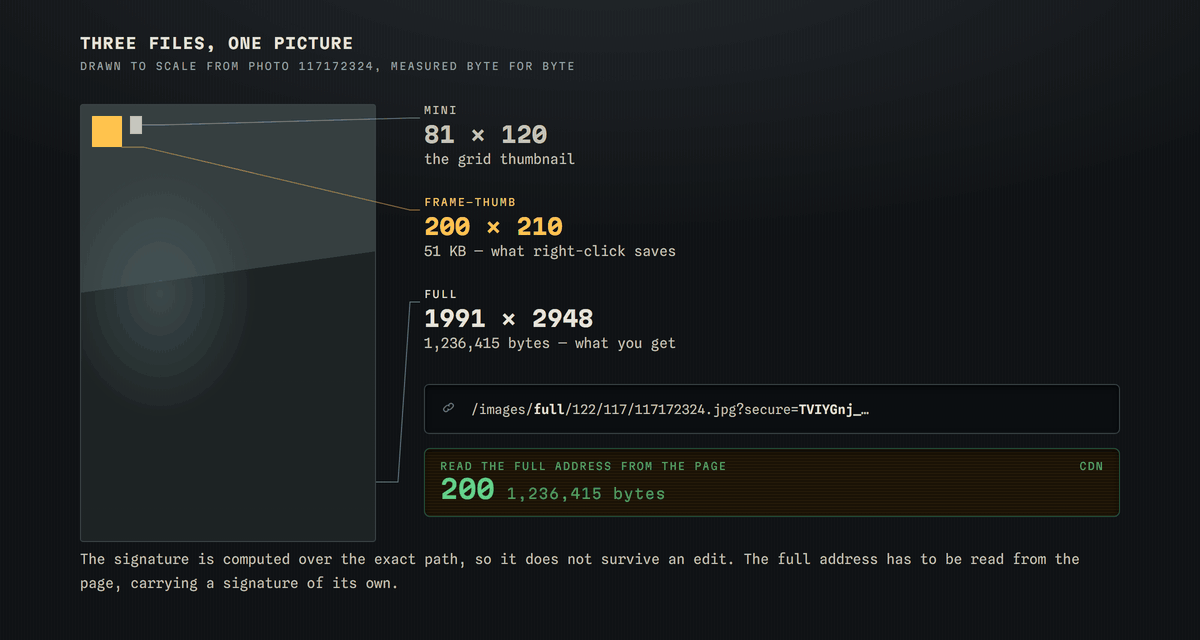
Every picture on ImageFap exists at three addresses. There is a small grid thumbnail, a mid-size preview the site calls a frame thumb, and the full file. The picture you are looking at on a photo page is the frame thumb — on one test picture that file was 200 by 210 pixels and 51 KB, while the image element around it declared the real dimensions as 1991 by 2948.
Why right-click saves the wrong one
Because the page shows you the frame thumb, saving the picture with a right-click saves the frame thumb. It looks correct at a glance and is a fraction of the real resolution. The full file lives at a different address that the page never puts in front of you.
Why you cannot just edit the address
Every picture address carries a signature. Swapping the word in the path from frame-thumb to full while keeping the same signature returns a flat refusal — the signature is computed over the exact path, so it does not survive the edit. The full address has to be read from the page, with its own signature attached.
What this tool hands you
The full file, byte for byte as ImageFap published it. Nothing is re-encoded, resized or stripped on the way through, because the picture never passes through us at all — your browser fetches it from the same address the site itself would use.